
We use cookies
We use essential cookies to run this site. With your permission, we'd also like to use analytics cookies to see how the site is used, and functional cookies for chat and videos. Change your choice any time under Cookie settings. Read our Cookies Policy
Server agent management
Install and manage the SeqOps agent on every server
Register each Windows or Linux server, then run the install command with its one-time registration token. Track every agent from Registered to Healthy. The agent only needs outbound HTTPS.
- 14-day free trial
- Read-only cloud access
- First results within 24 hours
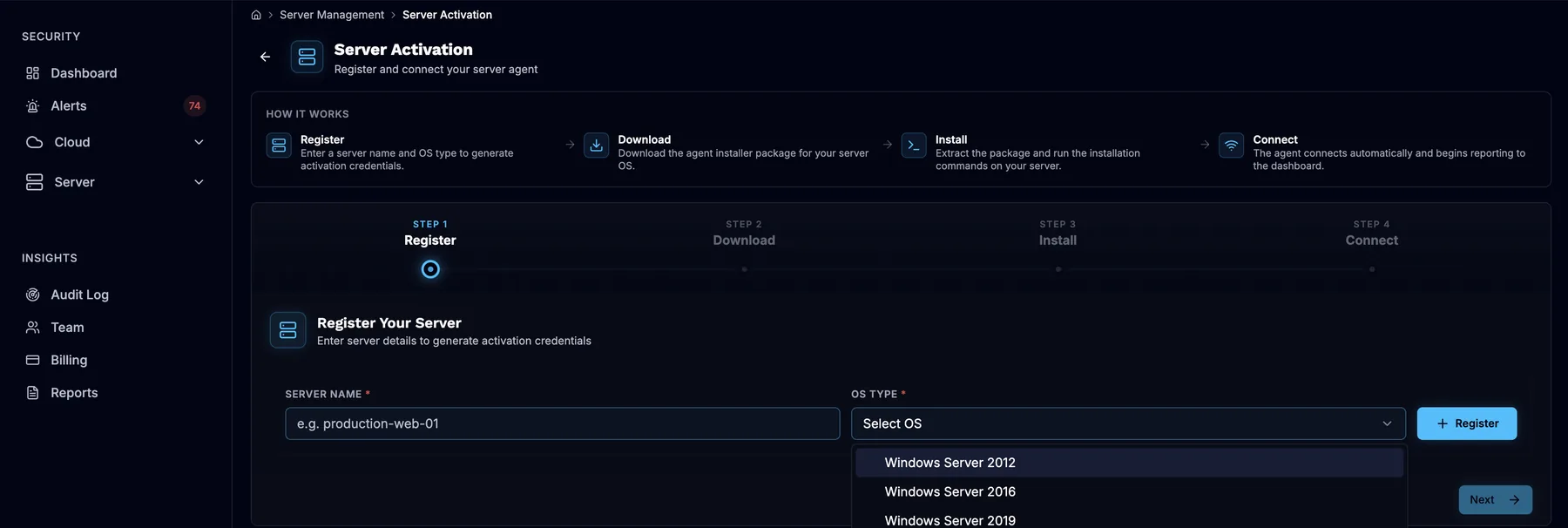
- Register
- Download
- Install
- Connect
Agent status
Outbound HTTPS only · no inbound ports
Coverage gaps start with agents you can’t see
A server without a working agent is a server you aren’t scanning. Agents stop reporting when a firewall rule changes, a service stops or credentials are wrong. If nobody notices, that server quietly drops out of your results.
SeqOps gives every agent a clear status. You see which servers report normally and which need attention. Each server is registered on its own, with its own credentials. You always know which registration belongs to which server.
Setup is one server at a time today. That makes planning simple: check your capacity, open outbound HTTPS and work through your servers in batches.
What you manage in SeqOps
- Server registration under Server → Activation, with the operating system type
- A unique Tenant ID, Server ID and registration token for each server
- Agent packages for Windows and Linux, downloaded from the server’s entry
- Two services on each server: the server agent and an updater service
- Agent status, from Registered to Connected to Healthy
- A server list showing each server’s status
- Plan capacity, with one agent slot per monitored server
- Deactivating or deleting servers you no longer need
Three steps per server
Step 1: Register the server
Open Server → Activation, enter the server name and choose the operating system. Then copy the Tenant ID, Server ID and registration token from View API Secrets.
Step 2: Install and provision
Download the agent package and install the services. Run the provisioning helper with the server’s credentials. The download link expires after about 3 minutes, so download just before you install.
Step 3: Check the status
Confirm both services are running and the server appears in your server list. The agent moves from Registered to Connected to Healthy. Data appears within 24 hours (6–24 hours).
What you get
Know which servers are covered
Every agent has a status. You can see at a glance which servers report normally and which have stopped, and fix the gap.
Credentials that can’t be reused
Each credential set works once and lasts about 7 days. Register servers shortly before you install them, in batches you can finish in that window.
Simple network requirements
The agent needs outbound HTTPS only. There are no inbound rules, no open listening ports and no cloud credentials on the server.
Control over capacity and history
Deactivating keeps a server’s history, but the server still uses its slot. Deleting frees the slot and can remove the history, so export reports first.
What the agent needs
You need administrator access to the server and outbound HTTPS on port 443. Windows servers also use outbound port 8443 during provisioning. Nothing connects in to the server. If traffic passes through a proxy, allow HTTPS to the SeqOps platform. The agent sends security metadata to SeqOps, hosted in AWS eu-north-1 (Stockholm), with TLS in transit.
The agent adds a view of what needs patching or hardening. It works alongside your endpoint protection, EDR, MDR or SIEM.
Visit the Trust CenterFrequently asked questions
Can I deploy the agent to many servers at once?
What if the registration token has expired?
Why does my agent show as offline?
What happens when I remove a server?
How many agents does my plan include?
Read the guides
Related on the platform
- Server scanning
Find vulnerabilities on Windows and Linux servers with a lightweight agent.
- Event history
A history of security events across your cloud and servers, kept by plan.
See what’s exposed in your cloud and servers
Start your 14-day free trial and get your first results within 24 hours.