
For IT teams and MSPs
See every vulnerability across your cloud and servers, and know what to fix first
SeqOps connects read-only to AWS, Azure and Google Cloud and to your Windows and Linux servers. It ranks every finding from Critical to Informational, explains the fix, and checks you against the compliance frameworks your auditors ask about.
- From $79/month
- First results within 24 hours
- Hosted in Stockholm
- Connect
- Scan
- Rank
- Fix
Scan complete · ranked Critical first
Ineffective network ACL deny rule
AWS · eu-north-1 · AWSEC2-NET-2101
S3 bucket allows public read access
AWS · eu-north-1
OpenSSH remote code execution (CVE-2024-6387)
Linux · web-prod-02, db-01
Firewall rule allows SSH from 0.0.0.0/0
Google Cloud · project-billing
Storage account allows public blob access
Azure · rg-shared
AutoPlay is enabled for all drives
Windows · demo-win-001
How to fix · Critical first
Update OpenSSH to the patched release on both servers, or set LoginGraceTime 0 as a temporary mitigation, then restart sshd.
- Critical firstEvery finding is ranked by severity.
- How to fixGuidance comes with each alert.
- Mapped to complianceChecks map to the frameworks you need.
Built into the platform
- access to your cloud accounts
- Read-only
- access to your cloud accounts
- connections only from the server agent
- Outbound
- connections only from the server agent
- of severity, Critical to Informational
- 5 levels
- of severity, Critical to Informational
- to first results after connecting
- 24 hours
- to first results after connecting
Who SeqOps is for
For IT teams
I manage my own infrastructure
Connect your cloud accounts and servers yourself and see your first findings within 24 hours.
Start free trialFor MSPs and MSSPs
I’m an MSP managing customers
One partner portal for every customer, capacity-based packages, and scheduled reports your customers can read.
See the partner programmeConnects to
 AWS
AWS'%20d='M33.338%206.544h26.038l-27.03%2080.087a4.152%204.152%200%200%201-3.933%202.824H8.149a4.145%204.145%200%200%201-3.928-5.47L29.404%209.368a4.152%204.152%200%200%201%203.934-2.825z'/%3e%3cpath%20fill='%230078D4'%20d='M71.175%2060.261h-41.29a1.911%201.911%200%200%200-1.305%203.309l26.532%2024.764a4.171%204.171%200%200%200%202.846%201.121h23.38z'/%3e%3cpath%20fill='url(%23azure-gradient)'%20d='M33.338%206.544a4.118%204.118%200%200%200-3.943%202.879L4.252%2083.917a4.14%204.14%200%200%200%203.908%205.538h20.787a4.443%204.443%200%200%200%203.41-2.9l5.014-14.777%2017.91%2016.705a4.237%204.237%200%200%200%202.666.972h23.304l-10.12-29.194-28.807-.009%2017.955-53.707z'/%3e%3cpath%20fill='%235EA0EF'%20d='M66.595%209.364a4.145%204.145%200%200%200-3.928-2.82H33.648a4.146%204.146%200%200%201%203.928%202.82l25.184%2074.62a4.146%204.146%200%200%201-3.928%205.472h29.02a4.146%204.146%200%200%200%203.927-5.472z'/%3e%3c/svg%3e) Microsoft Azure
Microsoft Azure'%20fill='%23ea4335'/%3e%3cpath%20id='Path_5851'%20data-name='Path%205851'%20d='M50.748,25.583A30.878,30.878,0,0,0,41.44,10.576L31.82,20.2A17.1,17.1,0,0,1,38.1,33.761v1.708a8.514,8.514,0,1,1,0,17.028H20.949l-1.684,1.828v10.27l1.684,1.611H38.1A22.214,22.214,0,0,0,50.748,25.583Z'%20transform='translate(18.309%20-2.815)'%20fill='%234285f4'/%3e%3cpath%20id='Path_5852'%20data-name='Path%205852'%20d='M21.265,41.362H38.389V27.653H21.265a8.406,8.406,0,0,1-3.512-.77l-2.429.746-6.9,6.854-.6,2.333A22.222,22.222,0,0,0,21.265,41.362Z'%20transform='translate(0.873%2022.029)'%20fill='%2334a853'/%3e%3cpath%20id='Path_5853'%20data-name='Path%205853'%20d='M26.514,15A22.271,22.271,0,0,0,13.069,54.923L23,44.99A8.562,8.562,0,1,1,34.33,33.662l9.933-9.933A22.246,22.246,0,0,0,26.513,15'%20transform='translate(-4.375%203.922)'%20fill='%23fbbc05'/%3e%3c/svg%3e) Google Cloud
Google Cloud Windows Server
 Linux
Linux
One view of your security, from cloud to server
See every cloud account and server, fix the findings that matter most, then prove your compliance.
Watch the overview
See SeqOps from the CEO
Andreas Johansson, CEO of SeqOps, walks through how SeqOps connects to your cloud and servers and what your team sees in the platform.

Andreas JohanssonCEO, SeqOps
How it works
Connected today, first results tomorrow
Step 1: Connect
Link AWS, Azure or Google Cloud with read-only access, and install the lightweight agent on your Windows and Linux servers. The agent only needs outbound HTTPS.
Step 2: Scan
SeqOps checks configurations, services and installed software against known vulnerabilities and security benchmarks. First results appear within 24 hours.
Step 3: Fix first
Work through one prioritised list, track each alert from New to Resolved, mark findings as accepted risk or false positive, and get alerts by email, Slack, Microsoft Teams, Jira or ServiceNow.
Everything your team needs to close the gaps
Take the tour through real SeqOps screens. Each step highlights what to look at. Sample data from a demo tenant.
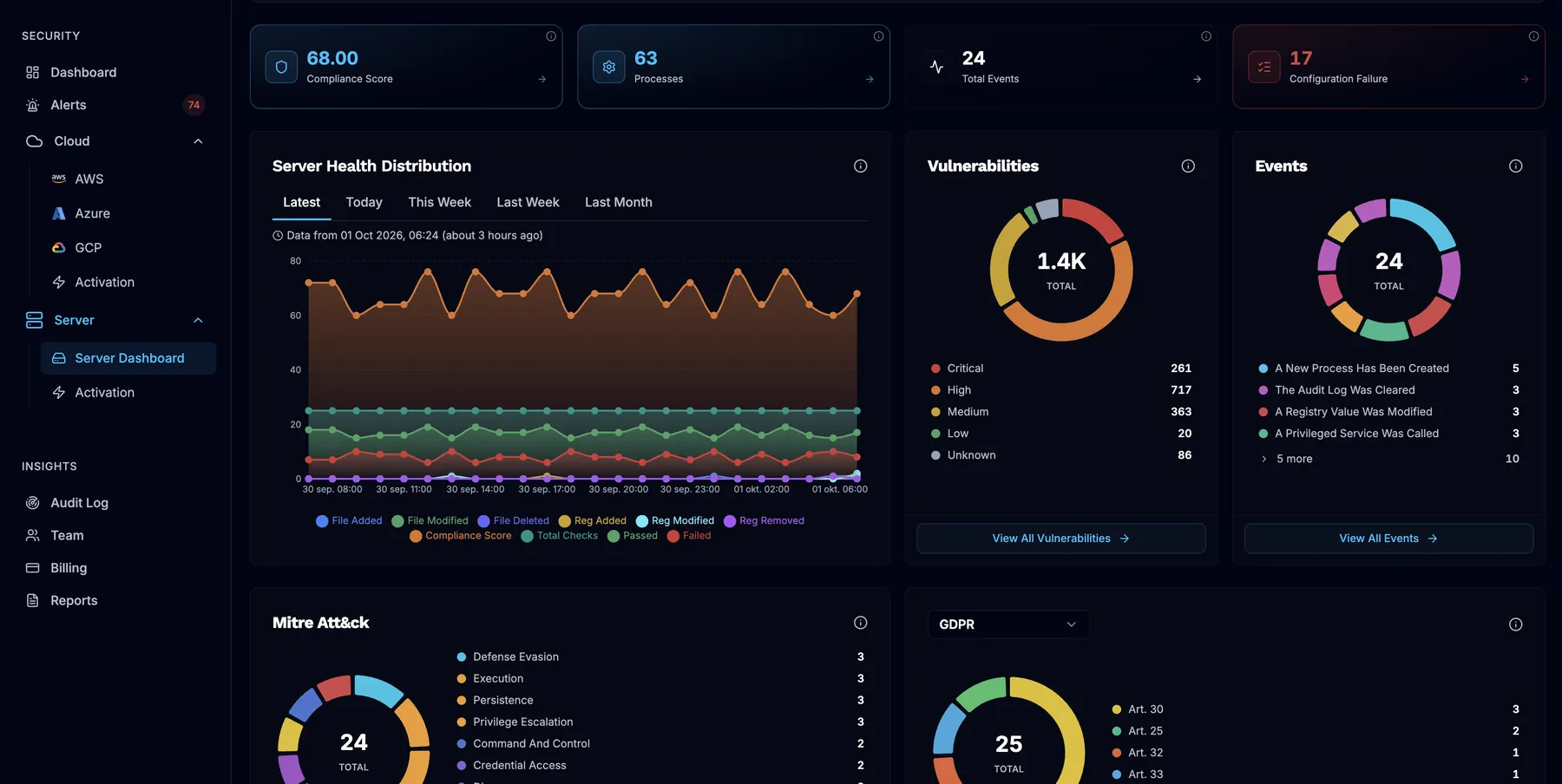
Your security posture across every connected cloud account and server, at a glance.
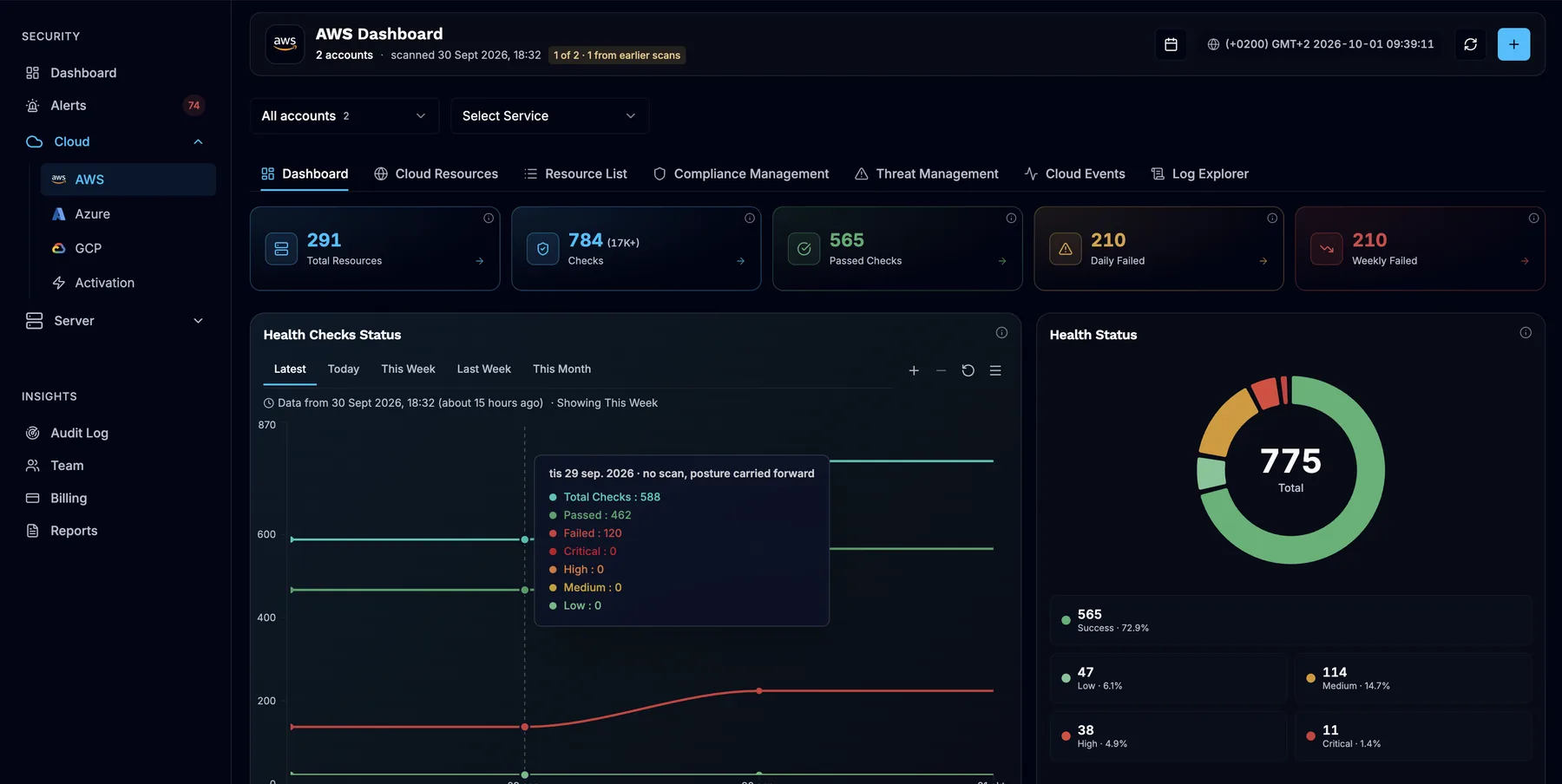
- Resources and checks across all connected accounts
- Health checks over time
- Health status: findings counted by severity



Remediation guidance
Every finding comes with the fix
AI-powered analysis explains each alert in plain language and suggests how to fix it. Assign it to the right person, and track it from New to Resolved.
- Severity, CVSS and risk score on every finding
- Why it matters, in plain language
- The change to make, ready to copy
aws ec2 replace-network-acl-entry \
  --network-acl-id acl-1234567890abcdef0 \
  --rule-number 110 --protocol 6 \
  --rule-action deny --egress \
  --cidr-block 0.0.0.0/0 \
  --port-range From=80,To=80
Sample data from the SeqOps demo tenant.
Compliance
Compliance evidence without the spreadsheets
SeqOps checks your cloud and servers against the frameworks your auditors ask about, and shows where you pass, where you don’t, and what to fix.
One set of checks, mapped to many frameworks. Pick the ones your plan includes.
Frameworks are the standards SeqOps checks against. Using SeqOps doesn’t certify your organisation.
Read our compliance guides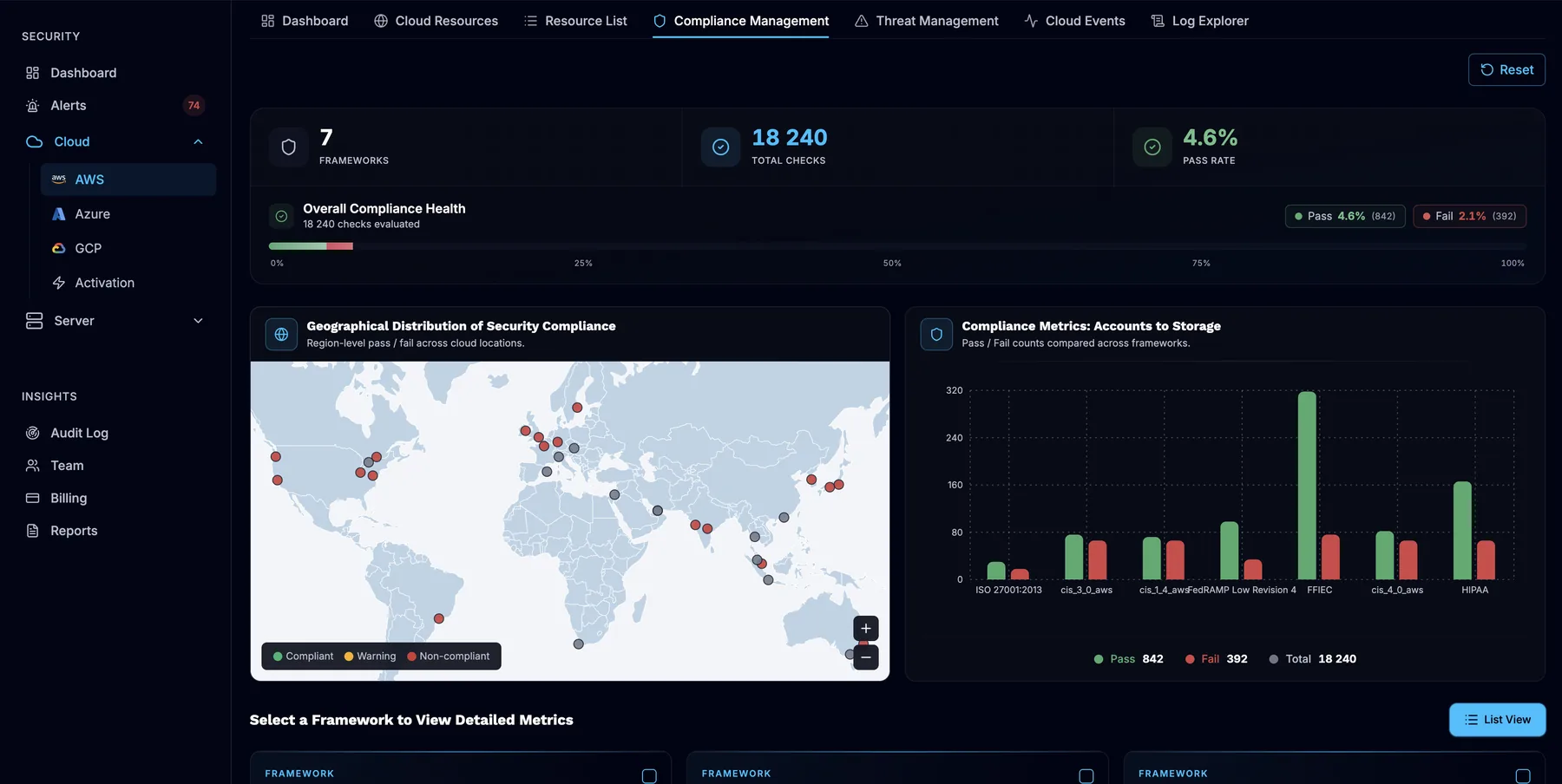
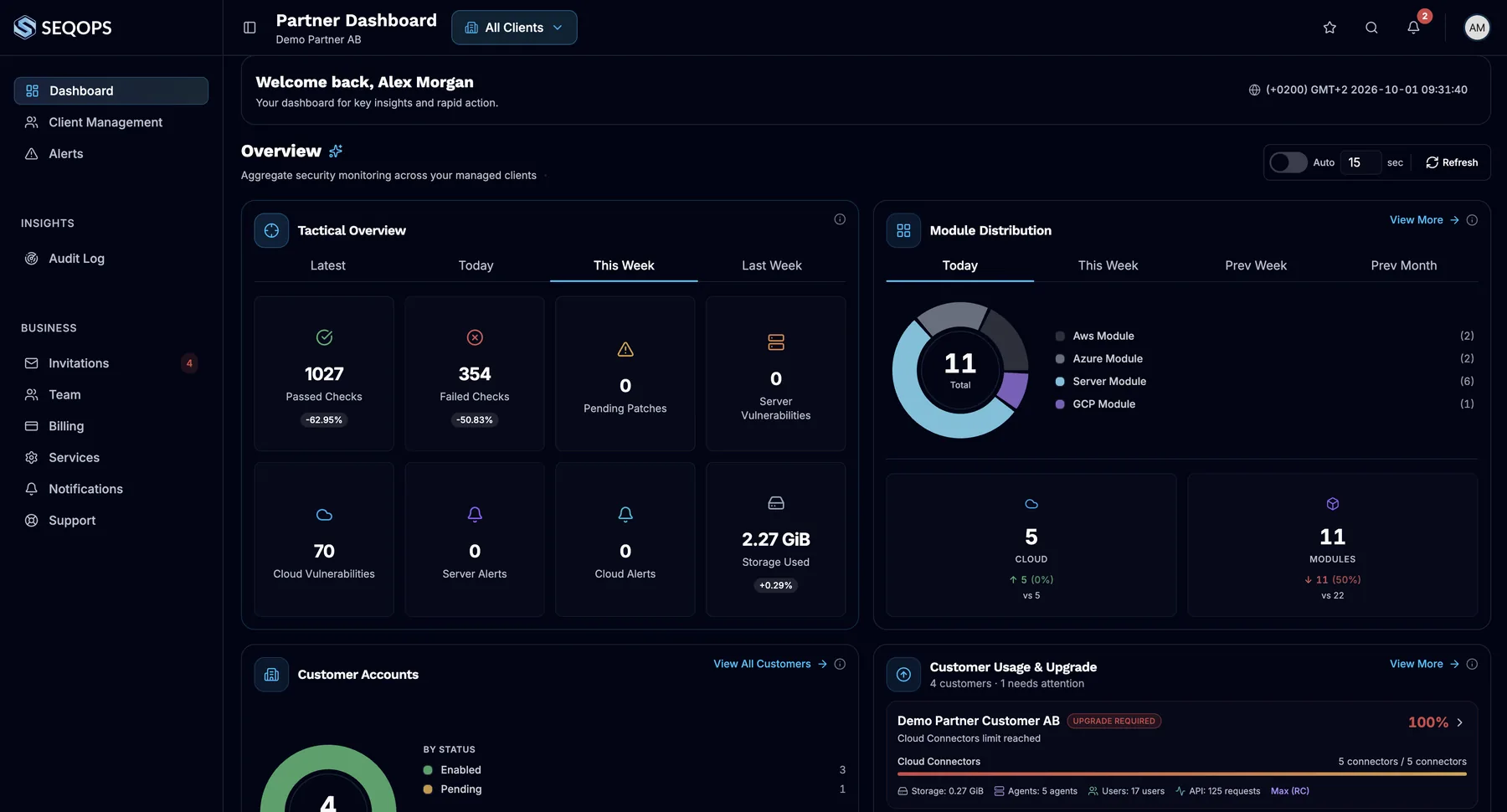
For MSPs and MSSPs
Turn security into a recurring service
Manage every customer from one multi-tenant partner portal, send each customer scheduled security reports, and grow with capacity-based partner packages.
One portal
Move between customer workspaces from your partner account.
Audit trail
Every partner session is recorded in the customer’s audit log.
Reports customers read
Scheduled security reports for each customer.
Capacity you control
Allocate a pool of agents and cloud connectors.
Customer story
How Opsio built a managed security service on SeqOps
“SeqOps allowed us to offer security as a managed service with real operational depth — not just dashboards, but actionable insights our customers trust.”
Johan Carlsson, Country Manager, Opsio · SeqOps partner
Read the Opsio storyNot ready for a trial yet?
Read how an MSP built a managed security service on SeqOps: how they packaged it, what they offer customers, and the results so far.
Enter your work email to open the full story. We may follow up once.
We’ll use your details to reply to you, as described in our Privacy Policy.
Built to be trusted with your infrastructure
Read-only cloud access
Cloud accounts connect with read-only permissions. SeqOps can’t change your cloud environment.Security metadata only
Configurations, software versions and settings, not your application data.Hosted in Stockholm
Your data is hosted in AWS eu-north-1. SeqOps AB is a Swedish company.Protected by design
TLS in transit, encrypted credentials, multi-factor authentication and an audit log.
Plans that grow with your infrastructure
Core
$79/month, billed yearly
1 cloud account · 10 servers · 3 users
EdgeRecommended
$159/month, billed yearly
3 cloud accounts · 20 servers · 5 users
Max
$319/month, billed yearly
5 cloud accounts · 30 servers · unlimited users
Need more? Enterprise plans are sized to your environment.
Questions teams ask before they start
What does SeqOps scan?
Does SeqOps replace Microsoft Defender or my EDR?
What access does SeqOps need?
Can I set it up myself, without a partner?
How quickly will I see results?
Where is my data stored?
How does the free trial work?
See what’s exposed in your cloud and servers
Start your 14-day free trial and get your first results within 24 hours.